
Overview
The "Classy Blockquote" module is a formatting feature commonly used in web development, documentation, and text processing to visually distinguish quoted content. It provides a structured way to present excerpts, citations, or emphasized text. And this module includes endless customization.
Features Included
Here are key features and effects that you might find in a "Classy Blockquote" module:
- Text Quotation Support: Enables the display of quoted text in a visually distinct format.
- HTML
<blockquote>Tag Support: Allows structured blockquote use attribute. - Author Information Various Position: You can set author information left, right and center, that too with one click.
- Author Profile Image: Author Profile Image is an optional field. You can set the top, bottom, left and right author profile image. And also support "Circle", "Square" and "Rounded" styles.
- Border Options: This field is also optional. You can set the border as top, bottom, right and left. That too according to your design.
- Border Radius: This field is an optional field. You can customize it yourself. That too as per your design.
- Box shadow: This field is an optional field. You can customize it yourself. That too as per your design.
- Interactive Demos: Allow users to interact with the Classy Blockquote through interactive demos. Click here view demo
- Unlimited Customization: Endless customization possibilities for design, allowing users to tailor the interface to their preferences without constraints.
- Smooth Transitions and Animations: Implementation of visually appealing transitions and animations to provide a polished and modern user experience.
- Cross-Browser Compatibility: Test and ensure compatibility with major browsers to provide a consistent experience. Consider using browser prefixes or polyfills for CSS features if needed.
- Responsive Design: Ensures a seamless and accessible user journey, accommodating users on different devices without compromising functionality or design.
Classy Blockquote improve readability by clearly differentiating quoted content. They are widely used in web pages, blogs, documentation, and text-based applications.
Module Setup
Setting up the "Classy Blockquote" Module is easy and straightforward. All you have to do is perform a simple drag and drop.
Now let’s go through the setup steps:
- Login to your HubSpot account and left side navigate to the “Content” tab.
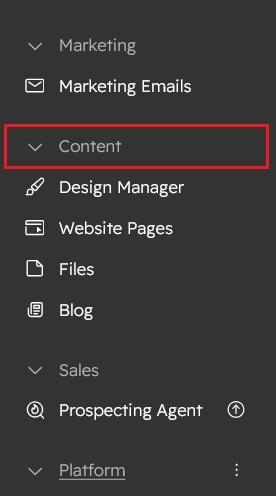
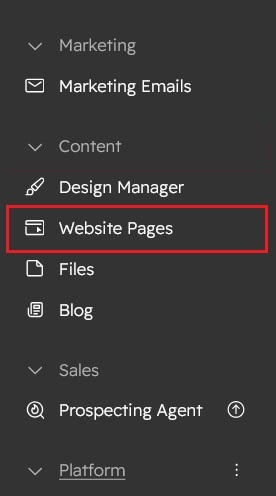
- Click on “Content” in the dropdown menu and select “Website Pages” from the extended menu.
- Under the module selection menu, search for “Classy Blockquote” and select the module
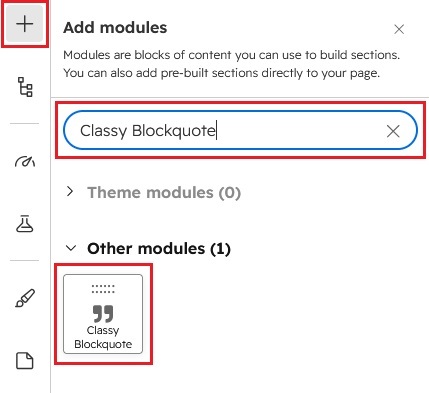
- Now simply pick the "Classy Blockquote" module, drag, and drop it wherever you want on your page. You’ll see a new module appear on the page.
Figure: Drag and Drop View


Support
If you have further questions, please reach out to our team at hawksky3012@gmail.com.