
Overview
A "Testimonials with Multiple Options" module is a component or feature on a website or application designed to showcase customer feedback, reviews, or testimonials. It serves as a trust-building element by providing social proof of the quality and reliability of a product, service, or business. Below is an overview of a typical testimonial module:
Features Included
Here are key features and effects that you might find in a "Testimonials with Multiple Options" module:
- Display Options: Carousel/Slider Formats.
- Multiple Style: Multiple style options are provided to display testimonials in this module. Such as "Top outer profile image with info", "Testimonials - Dark Version", "Top inner profile image with info", "Bottom inner profile image with info", "Bottom inner client info with profile image", "Bottom outer profile image with info", "Single item testimonials", "Two columns testimonials" "CenterMode", "Without CenterMode", "Alignment options", "Border style", "Hover and Active style", and "Background options" etc.
- Content Management: Easy to manage the Client name, photo/avatar, position/title, company, rating, testimonial text. Add/edit/delete and show/hide, bulk upload, featured testimonials.
- Carousel/Slider customization options : Carousel/Slider customization functionality is provided for desktop, tablet and mobile. Such as "SlidesToShow", "SlidesToScroll", "AutoplaySpeed", "Speed", "Autoplay", "Dots", "Arrows", and "CenterMode".
- Interactive Demos: Allow users to interact with the Testimonials with Multiple Options through interactive demos. Click here view demo
- Smooth Transitions and Animations: Implementation of visually appealing transitions and animations to provide a polished and modern user experience.
- Design and Customization: Endless customization possibilities for design, allowing users to tailor the interface to their preferences without constraints. Offers flexibility to customize according to the specific needs and requirements of the project or workflow.
- Cross-Browser Compatibility: Test and ensure compatibility with major browsers to provide a consistent experience. Consider using browser prefixes or polyfills for CSS features if needed.
- Responsive Design: Ensure that the Testimonials with Multiple Options module is responsive and compatible with various devices and screen sizes, including desktops, laptops, tablets, and smartphones.
These features ensure that a testimonials module is functional, engaging, and adaptable to various needs and platforms.
Module Setup
Setting up the "Testimonials with Multiple Options" Module is easy and straightforward. All you have to do is perform a simple drag and drop.
Now let’s go through the setup steps:
- Login to your HubSpot account and left side navigate to the “Content” tab.
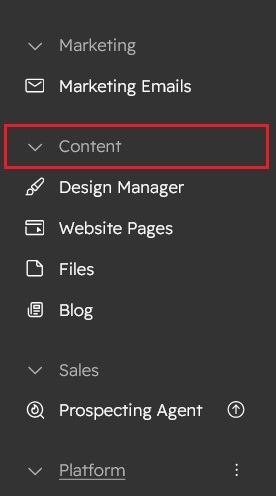
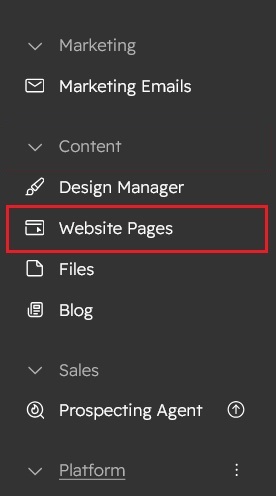
- Click on “Content” in the dropdown menu and select “Website Pages” from the extended menu.
- Under the module selection menu, search for “Testimonials with Multiple Options” and select the module
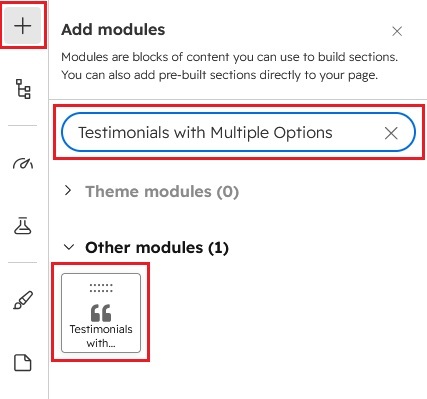
- Now simply pick the "Testimonials with Multiple Options" module, drag, and drop it wherever you want on your page. You’ll see a new module appear on the page.
Figure: Drag and Drop View

Content Setting

Under “Content”, you can edit the content you want to be easily adjust and update the “Section layout”, "Enable heading", "Enable animation", "Repeater testimonials items", "Client name", "Designation or Company name", "Testimonials text", "Rating image", "Client profile image" and more as you please.
Below is an overview listing of module content settings:
- Section layout: Section layouts can be set across module levels. Such as "Container" and "Full width".
- Enable animation: Animation of Heading and Repeater testimonials items can be shown/hidden using "Enable animation" field.

- Enable heading: Show/hide section heading.

- Animation: This group includes a field to animate headings. Like "fade", "flip" and "zoom".
- Overline text: You can use this field as a section highlight keyword.
- Heading text: This field as a section heading text.
- Testimonials style:

Multiple style options are provided to display testimonials in this module. Such as "Top outer profile image with info", "Testimonials - Dark Version", "Top inner profile image with info", "Bottom inner profile image with info", "Bottom inner client info with profile image", "Bottom outer profile image with info", "Single item testimonials", "Two columns testimonials" "CenterMode", "Without CenterMode", "Alignment options", "Border style", "Hover and Active style", and "Background options" etc. - Testimonials row animation: This group includes a field to animate testi. Like "fade", "flip" and "zoom".
- Testimonials items: This group is repeater group. This group is repeater group. Can be add/delete/update unlimited items.

- Profile image: Add/update/delete testimonials client profile image.
- Client name: Edit/delete or Update testimonials, client name.
- Designation: Edit/delete or Update testimonials, client designation.
- Client feedback: Edit/delete or Update testimonials, client reviews or feedback.
- Rating: This is an optional field. Can be Edit/delete or update testimonials rating
- Slider setting: This group includes custom slider setting. Such as Desktop, Tablet large, Tablet small and Mobile.


- SlidesToShow: # of slides to show
- SlidesToScroll: # of slides to scroll
- AutoplaySpeed: This field to manage the slider autoplay speed. Autoplay Speed in milliseconds.
- Speed: This field to manage the slider animation slide/fade speed.
- Autoplay: Enable/Disable Autoplay
- Dots: Show/hide dot indicators
- Arrows: Show/hide Prev/Next Arrows.
- CenterMode: Enables centered view with partial prev/next slides. Use with odd numbered slidesToShow counts.
- Module JS: Includes the module level jQuery CDN and Slick slider show/hide field.
Style Setting

- Section: Under section spacing and background to manage module background solid color, background gradient and background image with overlay solid color and gradient. And spacing to easily manage desktop, tablet and mobile padding.

- Heading: Easy customize the overline text typography font, color, line height, text transform and font weight and Heading alignment and spacing.
- Slider navigation: This group includes the testimonials slider navigation setting. Such a custom style of dots and arrows.
- Dots: This group includes the custom style of slider navigation dots. Such as "Size", "Bordered", "Color", "Bordered radius", "Hover color", "Active color" and "Alignment".
- Arrows: This group includes the custom style of slider navigation arrows. Such as "Arrows color" and "Arrows hover color".
- Boxes: This group includes the testimonials slider items custom style.

- Spacing: Spacing of boxes can be customizing for desktop, tablet and mobile.
- Background color: Using this field, the background color of the testimonials box can be changed, such as "Solid" and "Gradient".
- Border: Using this field, The border of this box can be changed.
- Enable boxshadow: Show/hide testimonials boxes, box-shadow.

- Grid gap: You can change the testimonials box gap as per the design and requirement.
- Hover boxes: Box hover "Solid Color", "Gradient Color" and "Box Shadow" are easy to change.
- Active centerMode item: Active slider item "Solid Color", "Gradient Color" and "Box Shadow" are easy to change.
- Boxes content: This group includes testimonial content custom styles. Such as style "Profile image", "Client name", "Designation", "Hover all elements color", "Active all elements color" and "Alignment".
- Profile image: Using this field, easy to change the "profile image size changeable in (Desktop, Tablet and Mobile)", "Border", "Border radius", "Hover border color" and "CenterMode border color".
- Client info: This group includes, customize the Client name, Designation, Review text and Rating such as style (Font size, Font Weight, Font color and Hover color, Active color).
- Alignment: Set horizontal alignment using the alignment options. Such as (left, center, right).
- Container custom size: Container width to customize the custom container width.
Support
If you have further questions, please reach out to our team at hawksky3012@gmail.com.